
CNC Manual, Part 1: Safety & PPE
Before You Touch the Machine
This is Part 1 of the Velocity CNC router manual for The Fertile Soil’s build side. Read this before you touch the router for the first time – regardless of experience elsewhere, every member needs a shop orientation from a certified CNC lead before running the machine unsupervised.
This CNC router is a powerful, fast-moving machine with a spinning cutting tool. Treat every session with full attention. No headphones with music, no phone in hand, no working alone if you’re new.
Required PPE (Every Time, No Exceptions)
- Safety glasses or a face shield – chips and dust fly. Regular glasses are not a substitute.
- Hearing protection – the spindle and dust collector are loud enough for sustained exposure to matter.
- Hair tied back, and no loose clothing, drawstrings, gloves, or jewelry – anything that can catch on a rotating tool or the tool changer must come off first. Gloves are especially dangerous near the spindle: never wear them while it’s running.
- Closed-toe shoes – dropped material and stray offcuts are common.
- Long hair, scarves, and lanyards are a real snag hazard around the tool-change rack – remove or tuck them in before you start.
Know Your Emergency Stop
Locate the red E-stop button before you power anything on. The control box sits at the front-left corner of the table. Pressing it immediately kills spindle and axis motion. Use it any time something looks, sounds, or feels wrong – a fault code, an unexpected move, material coming loose, or a person getting too close to the cutting area.
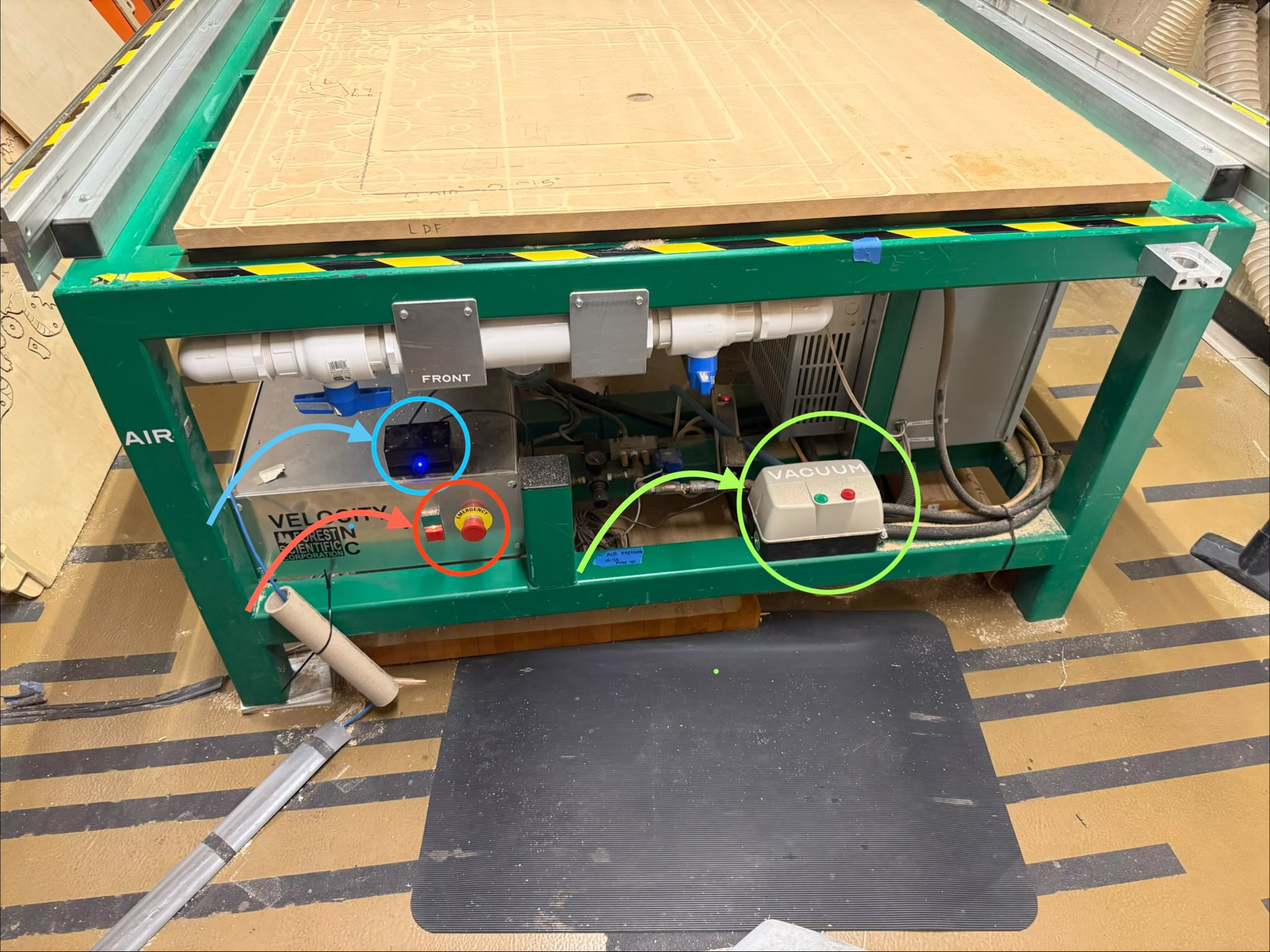
After an E-stop, don’t just reset and continue. Figure out what happened first, and get a shop lead if you’re not sure.
Dust Collection & Housekeeping
- Dust collection must be running any time the spindle is cutting. Confirm airflow at the hose before starting a job, not after.
- Clear chips and dust from the table and rails between jobs – buildup interferes with vacuum hold-down and hides small parts or fasteners that can turn into projectiles.
- Wood dust is a respiratory hazard even with collection running. If you’re doing a long or dusty job, a properly fitted dust mask is a good addition to safety glasses and hearing protection.
Rules While the Machine Is Running
- Never leave a running job unattended. Stay in the room and within reach of the E-stop for the entire cut.
- Keep hands, tools, and brushes away from the cutting area while the spindle is turning or the machine is in cycle – including during tool changes.
- Don’t bypass guards, interlocks, or safety switches for any reason. If a guard is making a job impossible, stop and ask a shop lead – don’t remove it yourself.
- Don’t reach into the tool-change rack while a job is running or the machine is powered – the finger-rack changer moves without warning between tool numbers.
- If material shifts, sounds wrong, or the tool appears to be deflecting or chattering badly, stop the job (Feed Hold, then E-stop if needed) rather than waiting to see what happens.
Before You Leave
- Vacuum/dust-collect the table and surrounding floor.
- Return any clamps, wrenches, or tools to their storage location.
- Report anything unusual – strange noises, error codes, a tool that didn’t seat right – to a shop lead, even if the job finished fine. Small issues caught early are cheap; the same issue ignored for weeks is not.
Next: Part 2 – Setup & Workflow, covering power-on, homing, material loading, and zeroing.